


If you work on productions, you know the drill: it's right before soundcheck, you're scrolling through the WhatsApp group looking for today's schedule. Between load-in photos, a catering question, and three voice messages, you find a PDF — but is it the version from this morning or the updated one from just now? Soundcheck got moved, you know that much. But by how long? And what does that mean for the rest of the day?
The problem isn't a lack of communication. The problem is the medium. PDFs in WhatsApp groups, printouts taped to the FOH desk, and touring software that nobody checks on the go — none of this was designed to keep a schedule up to date in real time.
Why the Traditional Day Sheet Falls Short
Day sheets as PDFs or printouts have worked for decades — as long as not much changed during a production day. Today, the reality looks different:
- Changes happen constantly — Delays, rescheduling, last-minute program changes. The info goes out via radio, WhatsApp, or word of mouth, but not everyone gets the memo.
- No push mechanism — Paper can't ring. And WhatsApp messages get buried under dozens of other messages. If you're on stage or in the warehouse, you miss the update.
- No clock at a glance — "How long is the current block?" — the answer requires mental math, every single time. Especially with delays, things get confusing fast.
- No big picture — Weather, delays, current position in the schedule — you have to piece it together from multiple sources instead of seeing it at a glance.
What a Digital Day Sheet Should Do
Not every app solves the problem. A PDF on your phone is just a digital piece of paper. For a digital schedule to actually work in production, it needs to:
- Deliver real-time updates without anyone having to ask. When the production manager changes the schedule, every crew member needs to know immediately — not when someone opens the app or reads a message.
- Be visible without unlocking your phone. On a production, you rarely have time to open an app and find the right tab. The most important info — what's happening now, how long left, what's next — needs to be instantly visible.
- Show delays. Every production has delays. A good digital day sheet doesn't just shift the start time — it shows everyone that and by how much the schedule has shifted.
- Work offline. Festivals in the middle of nowhere, venues with bad reception, basement stages without WiFi — a tool that only works online is useless when it matters most.
How CrewCue Does It
CrewCue was built for exactly this problem — by people who work on productions themselves.
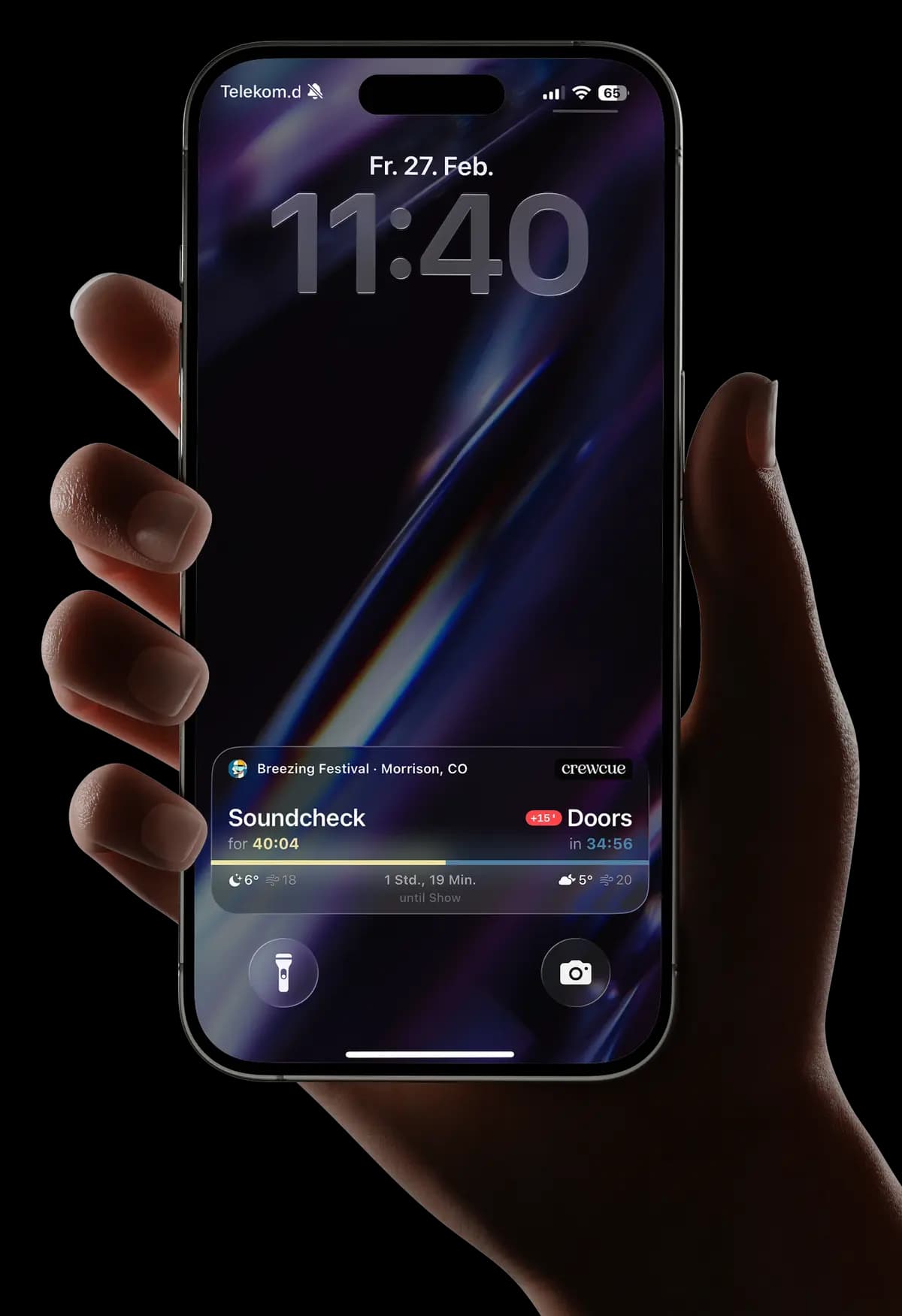
The core: your day sheet appears as a Live Activity directly on the iPhone lock screen. No opening the app, no unlocking. You glance at your phone and instantly see:
- The current schedule item with a live countdown
- The next entry
- Whether there's a delay
- The current weather forecast for the venue
- Crew alerts from the production manager
How It Works in Practice
- Create the day sheet: The production manager creates the schedule in the app — manually or by scanning (photo of the paper schedule or PDF, the rest happens automatically).
- Crew checks in: Starting one hour before the event, crew members check in. This activates the Live Activity on their lock screen.
- Real-time changes: If the schedule changes, everyone who's checked in gets an instant update — on the lock screen, without opening an app.
- Automatic check-out: After the last schedule item, you're done. Check-out happens automatically.
What Happens with Delays?
A real-world example: you're a technician at a festival. The headliner soundcheck was scheduled for 4 PM but it's running late. The production manager enters a 30-minute delay in CrewCue. Instantly, every crew member sees on their lock screen: "Soundcheck — Delay: +30 min".
No phone tree. No WhatsApp message that someone misses.
Who Benefits from a Digital Day Sheet?
Any production with a structured schedule and a team that needs to follow it:
- Concerts and tours — Soundcheck, doors, support, headliner, load-out
- Festivals — Multiple stages, parallel workflows, many departments
- Theater and musicals — Rehearsals, performances, changeover breaks
- Corporate events and trade shows — Program items, speaker changes, breaks
- TV and film productions — Shoot days with tight schedules
Anywhere multiple people need to follow a shared schedule and changes are the rule — not the exception.
Get Started in 5 Minutes
No IT project needed, no training required. The CrewCue iOS app is free to download. Get it from the App Store, create your first day sheet, and try it out. For teams, there's a flexible subscription managed through the CrewCue website.
The schedule on your lock screen is what you've been piecing together with PDFs, WhatsApp, and mental math — only automatic, real-time, and for everyone at once.